-
Type:
Bug
-
Status: Closed
-
Priority:
 Low
Low
-
Resolution: Done
-
Affects Version/s: None
-
Fix Version/s: None
-
Component/s: Integrations
-
Labels:None
-
Module:TSR
-
Reported by:Harbinger
-
Item State:Production Complete - Closed
-
Issue Importance:Q2
-
Code Reviewed By:Ramya Tantry
1] Login to the application as a admin on LB/Stage.
2] Navigate to Onboard module.
3] Navigate to "Manage Onboard Status" page.
4] Click on "Cancel Tours" link displaying after mouse hovering of any record.
5] Cancelled the assigned tour.
Actual Result:
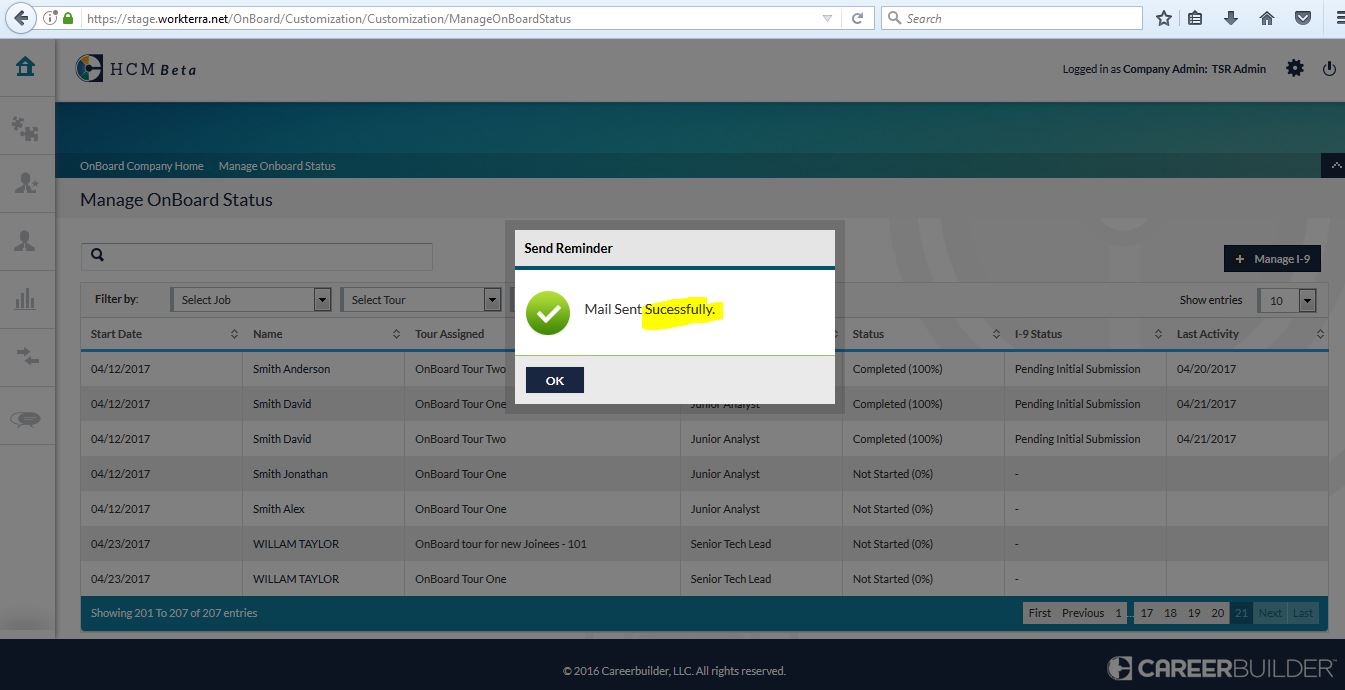
Successfully is spelled as Sucessfully"
Note Same issue is also displaying for Reminder message.
Refer attached screenshot for more details.