-
Type:
Bug
-
Status: Closed
-
Priority:
 Critical
-
Resolution: Done
-
Affects Version/s: None
-
Fix Version/s: None
-
Component/s: Integrations
-
Labels:None
-
Bug Type:Functional
-
Level:Admin
-
Module:TSR
-
Reported by:Harbinger
-
Item State:Production Complete - Closed
-
Issue Importance:Q2
-
Browser:Google Chrome
-
Code Reviewed By:Saurabh Sablaka
Environment - Local (wt-stage), Company - LONG, CityOfLakeWorth
Steps:
1] Login to the application as a partner.
2] Click on "Assign Classes & Payroll" tile.
3] Try to search any employee using search field or click on pagination numbers .
Actual Result:
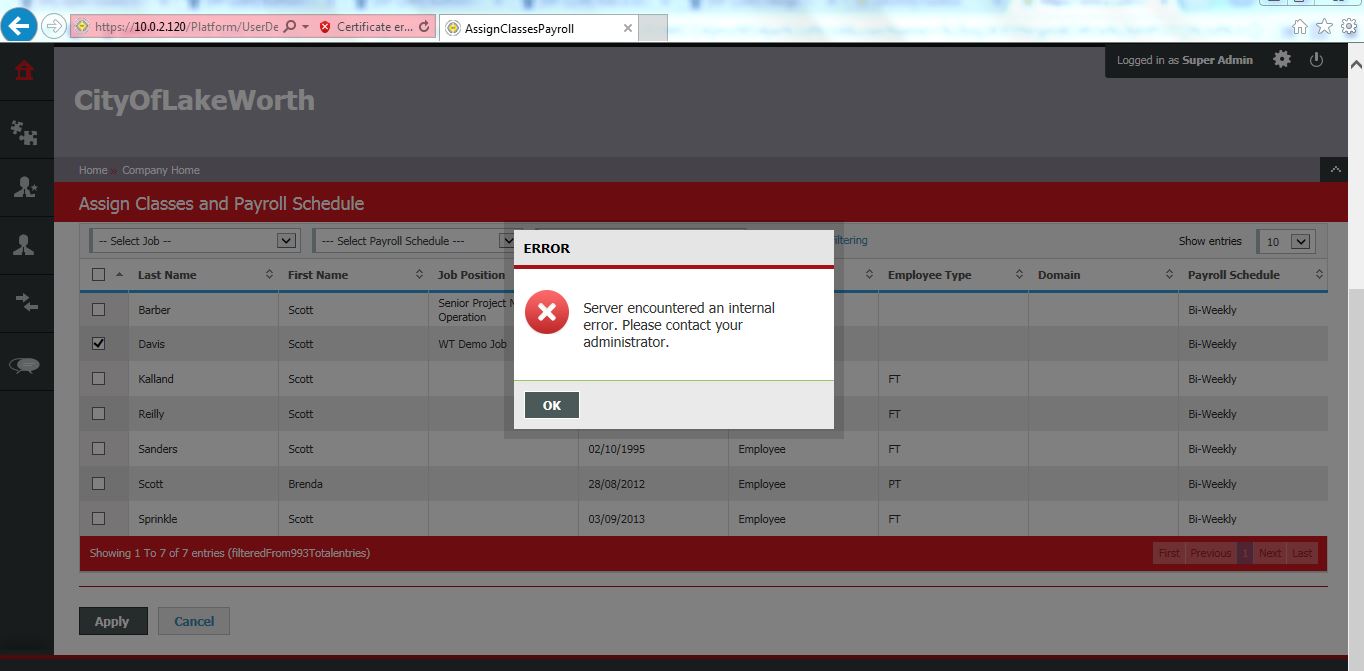
Server error is displaying.
Expected Result:
Server error should not be display.
Refer attached screenshot and error log for more details.
Cc: Sushodhan Vaishampayan, Komal Barde, Saurabh Sablaka, Prasad Pise
- relates to
-
NF-1139 Add a step for Admin review to update Classes and Payroll Schedule
-
- Closed
-

