Uploaded image for project: 'New Features 2017'
  1. New Features 2017
  2. NF-5803

SSO Integration>New UI>Chubb>Change the message text displaying after waiving chubb plan

    XMLWordPrintable

    Details

    • Type: Change Request
    • Status: Closed
    • Priority: Medium
    • Resolution: Done
    • Affects Version/s: None
    • Fix Version/s: None
    • Component/s: UI Refresh
    • Labels:
      None
    • Environment:
      Pre Production
    • Module:
      BenAdmin - SSO
    • Reported by:
      Harbinger
    • Company:
      Deep South
    • Issue Importance:
      Must Have
    • Severity:
      Simple

      Description

      Env - Preprod
      Company - Deep South For HSPL

      1] Login to workterra as a Employee.
      2] While traversing OE mode, click on ""Review Plan"" button for "Chubb Critical Illness"" plan.
      3] Employee gets redirected to Selerix SSO portal.
      4] Select "I want to cancel.." radio button.
      5] Click on the "Next" button.
      6] Waive plan at Chubb side.
      7] Employee get redirected to WorkTerra
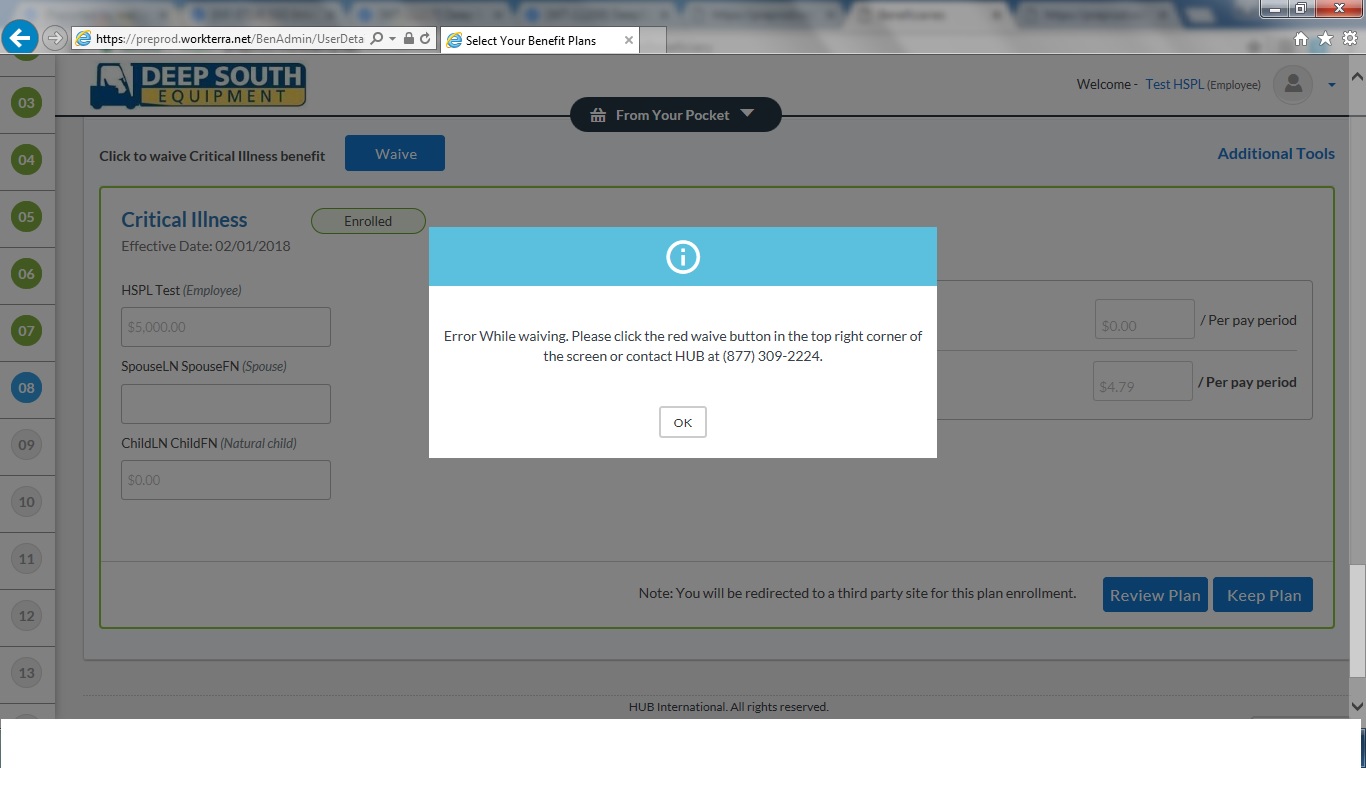
      8] Observe the message displaying at WorkTerra.

      Actual Result:
      "Error while waiving...." message is displaying.
      Expected Result:
      As there is no error such text should not be display, also as there is no red button at the top right corner in new so text related to it need to be changed.
      Refer attached screenshot for more details.

      Cc: Rakesh Roy, Prasad Pise

        Attachments

          Activity

            People

            Assignee:
            kunal.kedari Kunal Kedari (Inactive)
            Reporter:
            kunal.kedari Kunal Kedari (Inactive)
            QA:
            Kunal Kedari (Inactive)
            Votes:
            0 Vote for this issue
            Watchers:
            3 Start watching this issue

              Dates

              Created:
              Updated:
              Resolved:

                Time Tracking

                Estimated:
                Original Estimate - Not Specified
                Not Specified
                Remaining:
                Remaining Estimate - 0h
                0h
                Logged:
                Time Spent - 0.5h
                0.5h