-
Type:
Bug
-
Status: Closed
-
Priority:
 High
High
-
Resolution: Done
-
Affects Version/s: None
-
Fix Version/s: None
-
Component/s: Integrations
-
Labels:None
-
Module:TSR
-
Reported by:Harbinger
-
Item State:Production Complete - Closed
-
Issue Importance:Q1
-
Code Reviewed By:Saurabh Sablaka
1. Launch the Postman app.
2. Select “Post” request from dropdown.
3. Select authorization type as “Basic Auth”.
4. Enter valid User ID and Password.
5. Enter below URL:
https://10.0.2.120/api/employee/addEmployeeTour
6. Pass the require parameter using body.
7. Click on Send button.
8. Employee get added and success message also get display.
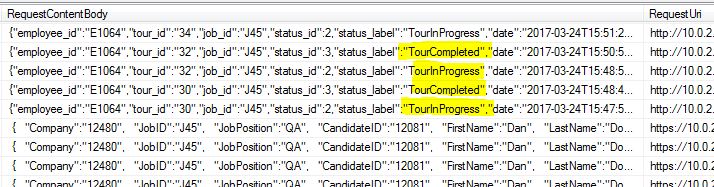
9. Connect to DB and observe RequestContentBody column under "WTAPIUtilizationLog" table.
Actual Result:
No record get inserted for tour initiated.
Expected Result:
Tour initiated record should get insert.
Saurabh Sablaka, Prasad Pise