-
Type:
Bug
-
Status: Closed
-
Priority:
 Low
Low
-
Resolution: Done
-
Affects Version/s: None
-
Fix Version/s: None
-
Component/s: Integrations
-
Labels:None
-
Bug Type:Functional
-
Level:Employee
-
Module:TSR
-
Reported by:Harbinger
-
Item State:Production Complete - Closed
-
Issue Importance:Q2
-
Browser:Google Chrome
-
Code Reviewed By:Saurabh Sablaka
Env - LB
Prerequisite - Set "Require Unique Email Address" from Company Information>System Settings to "Yes"
Steps:
1] Add a employee through API.
2] Start traversing the OB tour.
3] On "Demographics" page enter email ID which is already exists.
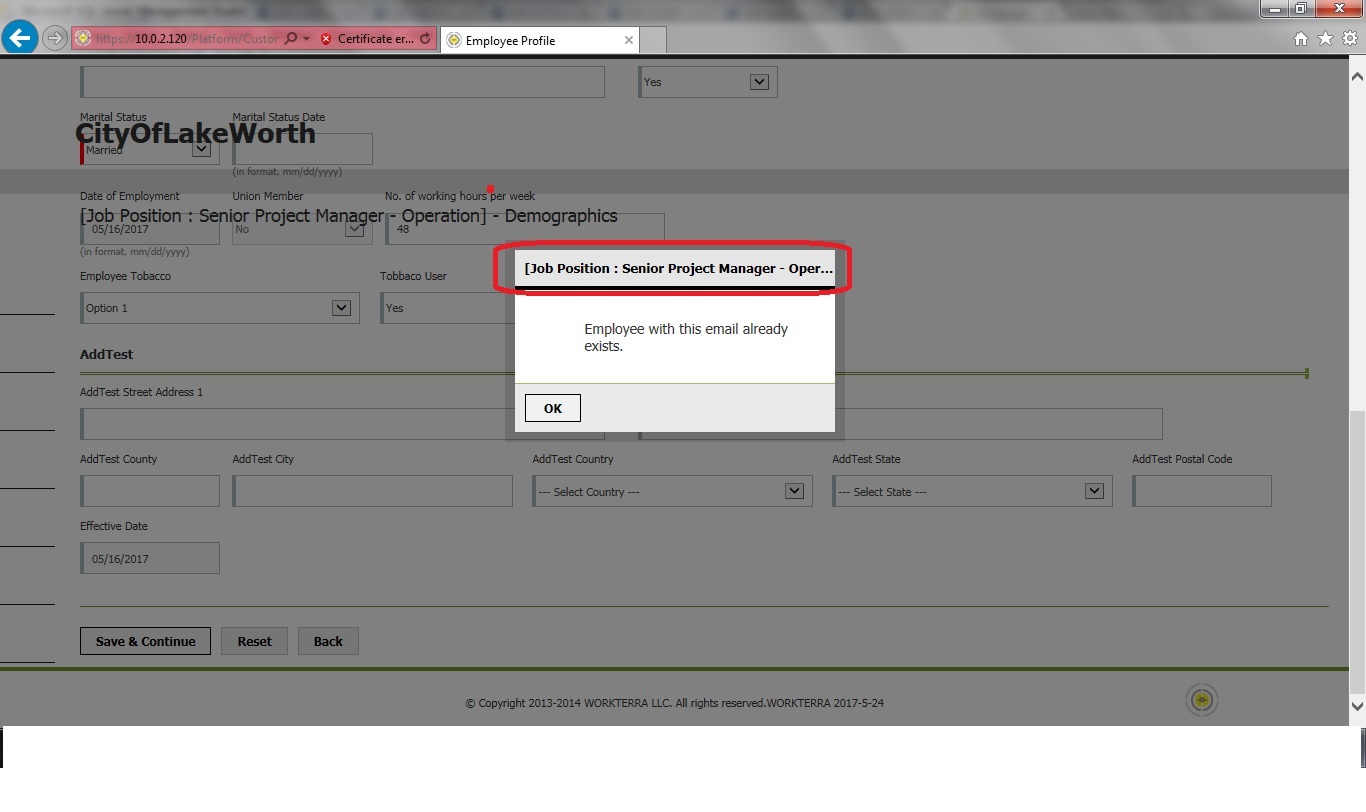
4] Pop up message regarding duplicate email ID is displaying, observe the pop up header.
Actual Result:
Job Position is displaying with "Demographics".
Expected Result:
Only Demographics should be display as a pop up title.
Cc : Saurabh Sablaka, Prasad Pise
- relates to
-
NF-1680 Add validation for Unique email address in system
-

- Closed
-

